Smart Home Interior Design Ideas
Smart technology can make a home more comfortable, convenient, secure, and energy-conscious. But there’s a design problem that often gets overlooked: smart devices can also create visual clutter.
A television may leave cables hanging down the wall. Speakers can compete with artwork. Chargers can take over nightstands and kitchen counters. Multiple sensors, hubs, switches, and controls can make an otherwise carefully designed room feel like a collection of gadgets.
The solution isn’t to avoid smart technology.
It’s to design around it.
The best smart home interiors make technology feel like part of the room rather than something added afterward. That can mean concealing cables, integrating speakers into walls or ceilings, coordinating controls with the room’s finishes, or simply giving devices a dedicated place.
Here are 11 practical smart home interior design ideas that can help you create a cleaner, more cohesive home.
Key Takeaways
- Plan smart technology alongside furniture, lighting, and room layout rather than afterward.
- Conceal cables and equipment where practical, but don’t sacrifice accessibility or performance.
- Use cabinetry, furniture, and dedicated storage to control visual clutter.
- Treat smart lighting and automated shades as part of the interior design.
- Keep essential physical controls available even when automation is the goal.
- Start with the rooms and routines where smart technology will provide the most useful benefit.
1. Conceal TV Cables Before They Become Visible Clutter
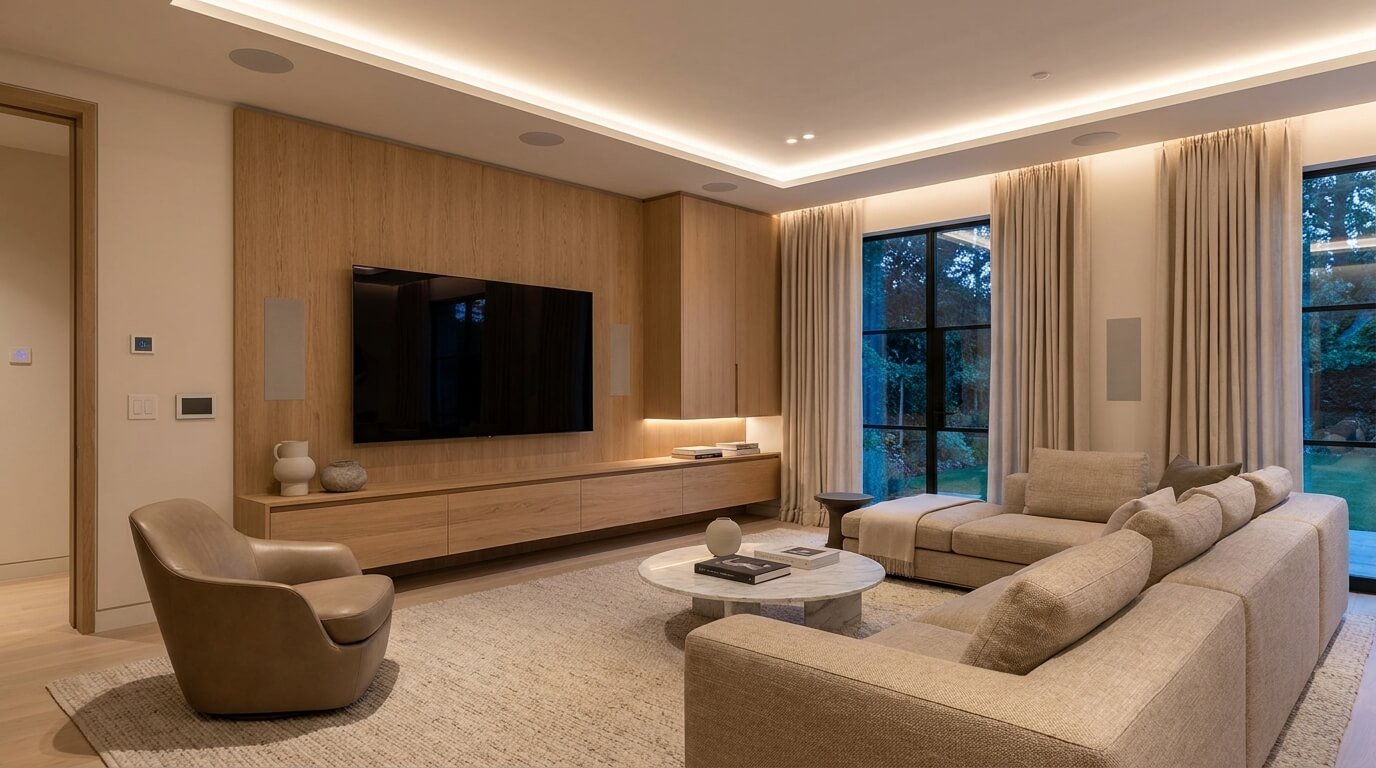
A wall-mounted television can look clean and modern until you see the cables.
Power cords, HDMI cables, streaming devices, game consoles, sound equipment, and other connections can quickly turn an attractive entertainment wall into a tangled collection of wires.
The best time to solve this problem is before the wall is finished or remodeled.
During a renovation, plan where the television, power, network connections, and related equipment will go. Depending on the installation and local requirements, cables may be routed through appropriate pathways or concealed using suitable cable-management systems.
For an existing room, surface-mounted cable channels, raceways, furniture, and organized equipment cabinets can provide less invasive solutions.
The goal isn’t simply to make cables invisible.
It’s to make the entire entertainment area look intentional.
A simple design approach
Think about three zones:
Screen: Where the television or display belongs.
Connections: Where power and network connections are needed.
Equipment: Where streaming devices, consoles, receivers, or other equipment will live.
Keeping these zones organized makes the room easier to maintain and visually calmer.
2. Build Smart Technology Into Cabinets and Furniture
Cabinetry can be one of the most useful tools for hiding smart-home equipment.
A media console can conceal streaming equipment. A kitchen cabinet can provide a home for charging devices. A desk can incorporate cable-management openings. A nightstand can contain a dedicated charging drawer.
The important detail is to avoid completely sealing equipment inside an unsuitable enclosed space.
Some electronic equipment requires ventilation, wireless connectivity, or easy access for maintenance.
So instead of asking:
“How can I hide this device completely?”
ask:
“How can I make this device visually discreet while keeping it functional?”
That small change in thinking produces better results.
3. Use Built-In or Architectural Speakers
Speakers are useful, but they don’t always need to become a major visual feature.
Where appropriate, built-in, in-wall, or in-ceiling speakers can reduce the amount of equipment sitting on shelves and furniture.
This can be particularly useful in living rooms, media rooms, kitchens, and other spaces where audio is used regularly.
However, speaker placement should be planned around the room rather than added as an afterthought.
Consider:
- Furniture placement
- Listening areas
- Ceiling height
- Wall construction
- Existing electrical and network infrastructure
- Access for future maintenance
CEDIA identifies whole-home audio and entertainment as common components of integrated smart-home systems, reinforcing the idea that technology can be planned as part of the overall home rather than treated as separate equipment.
4. Make Smart Lighting Part of the Interior Design
Smart lighting doesn’t have to mean filling the room with visible smart bulbs and gadgets.
In fact, lighting is one of the easiest areas to make almost invisible.
Start with the lighting design, then decide where smart controls add value.
A well-designed room may combine:
- Ambient lighting
- Task lighting
- Accent lighting
- Under-cabinet lighting
- Wall lighting
- Dimmable fixtures
- Motion or occupancy-based lighting where useful
Smart controls can then allow these layers to work together.
For example, a living room might have:
Reading: Brighter task lighting near the chair.
Movie: Main lights dimmed while accent lighting remains low.
Evening: Warm, softer illumination throughout the room.
Away: Selected lights turned off automatically.
CEDIA notes that smart-home systems can connect lighting with other functions and create scenes and schedules around everyday routines.
Layer the Lighting
One of the biggest design mistakes is treating smart lighting as a replacement for good lighting design.
Technology can’t fix poor placement.
First determine where the room needs light. Then use smart controls to make those lighting layers easier to manage.
Hide Controls Where Appropriate
Controls don’t have to disappear completely.
A conveniently placed switch can be more useful than an app for a simple task.
Choose control locations based on how people actually move through the room.
5. Integrate Motorized Shades With Window Treatments
Window treatments can become an elegant part of smart home design when automation is considered early.
Instead of treating the motor and controls as separate technology, design the shades, curtains, hardware, and surrounding trim as one visual system.
Motorized shades can be useful for:
- Privacy
- Daylight control
- Glare management
- Bedroom routines
- Living-room scenes
- Automated schedules
For example, a bedroom could have a morning routine that gradually opens compatible shades while adjusting lighting.
A living room could close shades during periods of strong sunlight to reduce glare on a television.
The important design principle is simple:
The window treatment should remain the visual feature, not the automation hardware.
6. Give Smart Devices a Dedicated Home
Not every device needs to be hidden inside a wall.
Sometimes the easiest way to make technology look organized is simply to give it a defined location.
Create dedicated spaces for:
- Smart hubs
- Charging equipment
- Tablets
- Remotes
- Controllers
- Security equipment
- Network accessories
- Small speakers
A dedicated drawer, cabinet shelf, console compartment, or charging station can prevent technology from spreading across the room.
This works particularly well in entryways and living rooms.
Instead of having keys, phones, chargers, remotes, and devices scattered across several surfaces, create one organized technology zone.
The result is often more effective than trying to make every individual device invisible.
7. Create a Clean Charging Station
Phones, tablets, smartwatches, earbuds, and other devices can quickly create countertop clutter.
A dedicated charging station gives these items one predictable home.
Depending on your space, it could be:
- A drawer with cable-management openings
- A shelf inside a cabinet
- A bedside charging compartment
- A desk organizer
- A kitchen charging area
- An entryway console
The best location depends on where devices naturally accumulate.
For example, a bedroom charging station makes sense near the bedside, while a family charging station may work better in a common area.
Don’t place it somewhere inconvenient just because it is visually hidden.
A charging station that nobody uses will simply move the clutter somewhere else.
8. Plan Thermostats and Sensors Around the Room
Smart thermostats and sensors are functional devices, but their location can affect both appearance and performance.
A thermostat should be positioned where it can appropriately sense the conditions it is intended to measure. Furniture, direct sunlight, drafts, and other environmental factors can affect readings.
That means hiding a thermostat behind artwork or placing a sensor inside a cabinet simply because it looks cleaner may be a bad design decision.
The better approach is to choose a location that works technically and visually.
You can also coordinate the surrounding wall, trim, and hardware so the device doesn’t look like an accidental addition.
For U.S. homeowners, ENERGY STAR notes that certified smart thermostats can provide features such as remote control, scheduling, geofencing, and learning capabilities. It also recommends checking compatibility with the home’s heating and cooling system before purchase.
9. Keep Networking Equipment Organized and Accessible
Smart-home technology depends on connectivity, so networking equipment deserves attention during interior planning.
Routers, access points, switches, and other networking equipment can easily become visual clutter when placed randomly.
But completely hiding them isn’t always the answer.
You need to consider:
- Signal coverage
- Ventilation
- Power access
- Cable management
- Maintenance
- Future upgrades
A good solution might be a dedicated utility area, properly designed cabinet, equipment shelf, or other accessible location.
Don’t prioritize appearance so heavily that you weaken network performance.
A beautifully hidden router that creates unreliable connectivity isn’t a successful smart-home design.
10. Use Simple Automation Scenes Instead of More Gadgets
One of the easiest ways to make a smart home feel sophisticated is actually to reduce the number of things you have to think about.
Instead of adding another device for every task, combine compatible devices into simple scenes.
For example:
Good Morning
- Bedroom lighting adjusts
- Compatible shades open
- Thermostat changes to the preferred setting
Movie Night
- Shades close
- Selected lights dim
- Entertainment equipment activates
Good Night
- Selected lights turn off
- Bedroom lighting adjusts
- Shades lower
- Compatible doors lock
Away
- Selected lights switch off
- Thermostat adjusts
- Security features activate
The exact capabilities depend on the products and system you use.
The design principle remains the same:
Automate routines rather than collecting gadgets.
A well-designed smart home should feel simpler, not more complicated.
11. Choose Technology That Matches the Interior
Sometimes the best way to hide technology is not to hide it at all.
A device that fits the room’s design can become a subtle part of the interior.
Look at:
- Finish
- Size
- Shape
- Placement
- Color
- Materials
- Visibility
- Control style
For example, a visible control panel may look intentional when coordinated with the home’s switches and hardware.
A speaker may work better as part of a carefully designed media area than hidden somewhere that compromises sound quality.
This is where smart-home design becomes different from simply installing smart devices.
The question isn’t:
“Can I connect this?”
It’s:
“Does this improve the room, and does it belong here?”
How to Plan a Smart Interior Before Remodeling
If you’re renovating or building, plan smart technology before walls, ceilings, cabinetry, and finishes are finalized.
Make a list of the spaces where technology could be useful.
Then consider:
- Where furniture will go.
- Where people will sit, work, cook, sleep, or entertain.
- Where lighting is needed.
- Where controls should be located.
- Where power outlets are needed.
- Where network connections may be useful.
- Where speakers could be placed.
- Where equipment will be stored.
- Which technology should remain visible.
- Which technology should be concealed.
This is also the stage where it can make sense to discuss electrical, networking, and integrated technology requirements with appropriately qualified professionals.
CEDIA’s current guidance emphasizes bringing smart-home integration into the design and build conversation early, when layouts, infrastructure, and user experience are still being defined.
Smart Home Design Mistakes to Avoid
Buying devices before planning the room
A smart device may seem useful in isolation but become awkward once furniture and lighting are considered.
Plan the space first.
Hiding everything
Not every piece of technology needs to disappear.
If hiding something makes it difficult to access, maintain, control, or connect, the design has gone too far.
Ignoring cable management
A smart television, gaming system, speakers, chargers, and networking equipment can create more clutter than traditional electronics if cables aren’t planned.
Automating every function
Automation should solve a real problem.
If a manual action already takes one second and is convenient, automating it may add unnecessary complexity.
Removing physical controls
Apps and voice control are useful, but physical switches and controls can remain valuable for everyday use, guests, children, or situations where a phone isn’t convenient.
Forgetting future changes
Technology evolves.
Avoid designing a room around one specific device if a more flexible approach can achieve the same result.
Sacrificing performance for appearance
Don’t put equipment somewhere unsuitable simply because it looks cleaner.
A smart interior still needs reliable networking, appropriate ventilation, accessible controls, and maintainable equipment.
How to Start if You Don’t Want to Automate the Whole House
You don’t need to turn your entire home into a smart home at once.
In fact, starting small can make the process easier.
Choose one room where technology can solve an obvious problem.
For example:
Living room: smart lighting, TV cable management, shades, and entertainment scenes.
Bedroom: lighting, shades, thermostat control, and a charging station.
Kitchen: under-cabinet lighting, smart controls, and a dedicated device area.
Home office: lighting, charging, cable management, and reliable connectivity.
CEDIA similarly recommends a room-by-room approach for homeowners who don’t want to commit to whole-home automation immediately.
Start with one useful improvement.
Use it.
Then decide whether another upgrade is genuinely worthwhile.
Smart Home Interior Design Checklist
Before adding smart technology, ask:
- ☐ What problem am I trying to solve?
- ☐ Does this device actually make the room easier to use?
- ☐ Where will the device live?
- ☐ Can the cables be organized?
- ☐ Does it need ventilation?
- ☐ Will it have reliable network connectivity?
- ☐ Can I access it for maintenance?
- ☐ Does it fit the room’s style?
- ☐ Is a physical control still useful?
- ☐ Will everyone in the household understand how to use it?
- ☐ Can the system be expanded later?
- ☐ Am I adding technology because I need it or simply because I can?
That last question can prevent a surprising amount of unnecessary spending.
Frequently Asked Questions
How can I make my smart home look less cluttered?
Start with cable management, dedicated equipment storage, coordinated controls, and thoughtful device placement. Technology that can be integrated into cabinetry, furniture, walls, or ceilings can also reduce visual clutter when appropriate.
Does smart home technology have to be visible?
No. Some technology can be concealed or integrated into the architecture and furniture. However, hiding a device should never compromise performance, safety, accessibility, ventilation, or maintenance.
What is the easiest smart home feature to integrate into interior design?
Smart lighting is often a practical starting point because lighting is already an important part of interior design. Dimmers, scenes, schedules, and compatible sensors can be incorporated without making technology the visual focus.
How do I hide smart home cables?
During remodeling, plan suitable cable pathways and power locations before walls and finishes are completed. In existing homes, cable channels, furniture, cabinetry, and organized equipment storage can provide less invasive options. Permanent electrical or in-wall work should follow applicable requirements and be handled by appropriately qualified professionals where required.
Should I hide my Wi-Fi router?
Not necessarily. The router or networking equipment needs an appropriate location for reliable connectivity and adequate ventilation. If you want a cleaner appearance, use a suitable, accessible location rather than placing the equipment somewhere that significantly interferes with its performance.
Can smart home technology work with traditional interior design?
Yes. Smart technology doesn’t require a modern or minimalist interior. Controls, lighting, speakers, shades, and other equipment can be selected and positioned to work with traditional, transitional, contemporary, farmhouse, industrial, or other design styles.
Is it better to automate one room or the entire house?
For many homeowners, starting with one room is easier. Choose the space where automation solves the most noticeable everyday problem, then expand only if the system proves useful.
Final Thoughts
The best smart home interior design ideas aren’t about hiding every piece of technology.
They’re about making technology fit the home instead of making the home revolve around technology.
Plan cables before they become a problem. Give devices dedicated storage. Treat lighting and window treatments as part of the interior design. Keep controls convenient. Protect network performance. And automate routines that genuinely make daily life easier.
Most importantly, don’t confuse more technology with better design.
A home with fewer, well-integrated smart features can be more comfortable and attractive than one filled with devices that nobody really needs.
When the planning is right, the technology becomes almost invisible.
You notice the comfortable temperature, the right lighting, the uncluttered media wall, and the shades that move when you need them.
You don’t necessarily notice the technology making it happen.
That’s what makes a smart home feel thoughtfully designed.
nnRelated resources: Homes With Black Windows: 15 Stylish Ideas and Design Tips · How to Measure for Curtains (Without the Costly Mistakes)